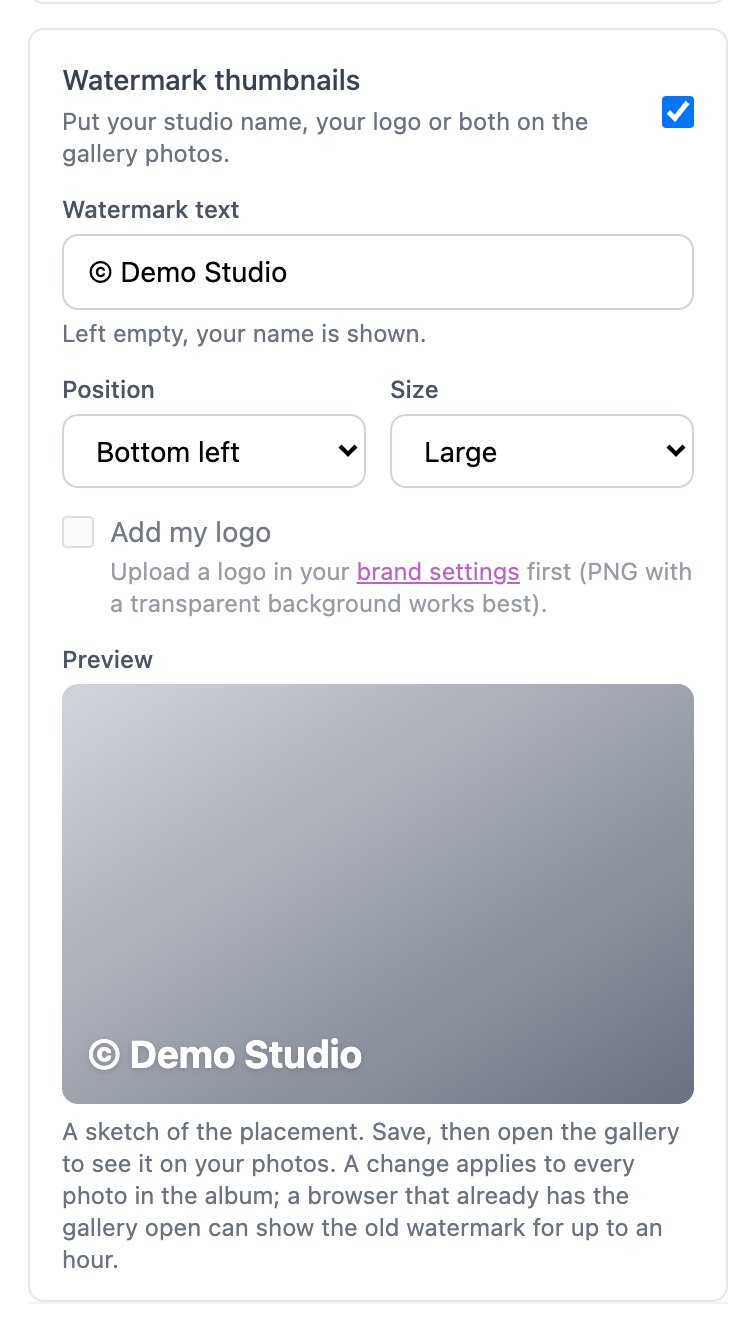
Until now the watermark on your gallery photos was a line of text in the bottom right corner, in one size. Since 15 November 2026 you decide what it shows, where it sits and how big it is. A photographer asked for this the day before.
Your logo, your text, or both
Open an album, go to its settings and switch on "Watermark thumbnails". Below the watermark text you now find "Add my logo". Tick it and the logo from your brand settings is drawn on the photos.
- Logo and text: the logo sits above the text.
- Logo alone: leave the watermark text empty.
- Text alone: leave "Add my logo" unticked. If the text is empty too, your name is shown.
No logo uploaded yet? Open Settings, then Brand kit and add one. A PNG with a transparent background works best.
Where it sits and how big it is
Two new choices next to it:
- Position: bottom right, bottom left, top right, top left or centre.
- Size: small, medium or large.
A small sketch below the choices shows the placement while you change it.
It applies to the whole album at once
The watermark is drawn when a photo is shown, so a change reaches every photo in the album, old and new. There is nothing to re-apply for photos you uploaded earlier. A browser that already has the gallery open can show the previous watermark for up to an hour.
The watermark is on the photos guests browse in the gallery. Downloads are not watermarked.
Watermarking is part of the Pro plan and above. Existing albums keep what they had: bottom right, medium, no logo.